Akinmusire Charles
Software Developer, educator & CEO Tic Atelier
A Voting System Using Python Tkinter and sqlite
One of the most popular programming language out there is python. And we can agree that elections could turn out to be not fair and stressful especially if not automated. This particular project was created to help beginners solve real life problems with less technicality and less complexity.
Everything here is actually dedicated to Akanbi Halimat. She suggested the idea during a coding lecture.
Getting started with the Project
- Install Python 3.11.X: Ignore this if you have python already installed
- Install Your Text Editor: Any text editor is fine. We used visual studio code here at our end.
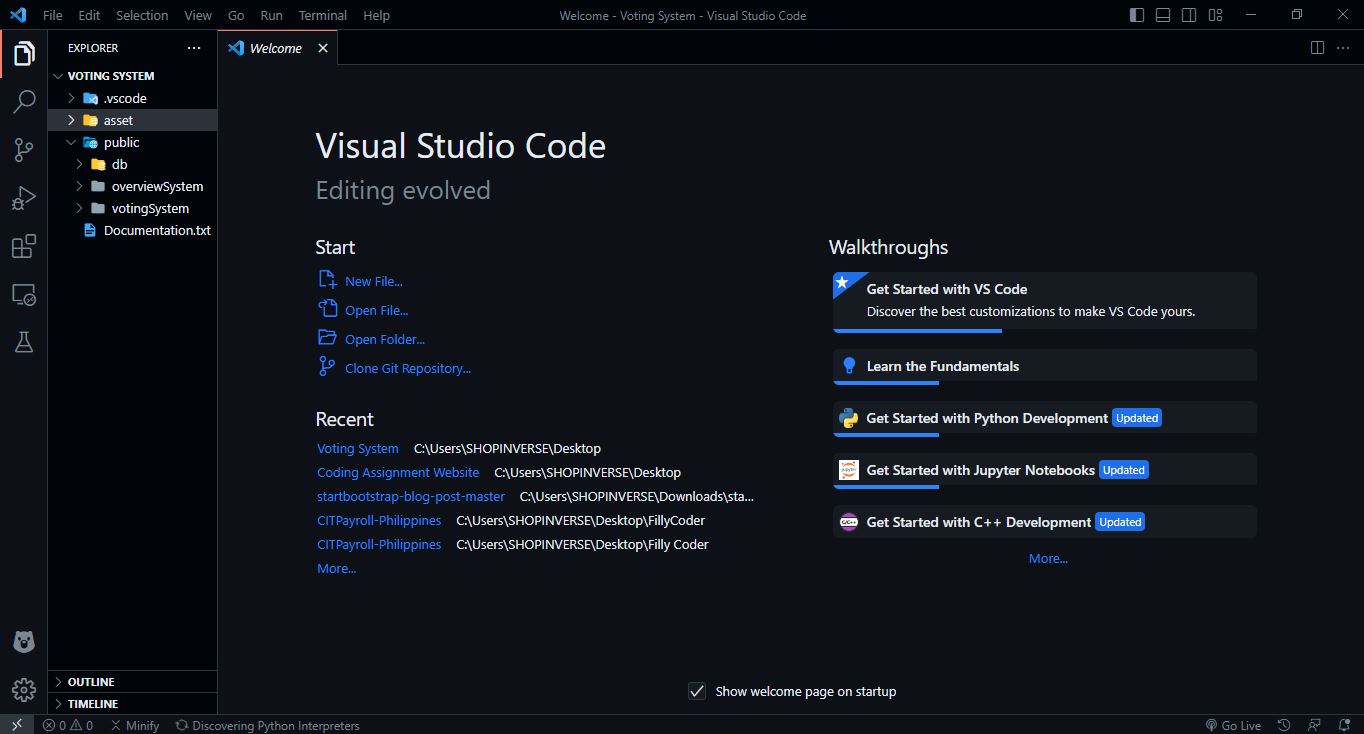
- Create Folders for project: Follow the directory below
Connecting to database
Create a sqlite.py file in the db folder. The database variable under the main() function should contain the path to the file of the database.
import sqlite3
from sqlite3 import Error


def create_connection(db_file):
    """ create a database connection to the SQLite database
        specified by db_file
    :param db_file: database file
    :return: Connection object or None
    """
    conn = None
    try:
        conn = sqlite3.connect(db_file)
        return conn
    except Error as e:
        print(e)

    return conn


def create_table(conn, create_table_sql):
    """ create a table from the create_table_sql statement
    :param conn: Connection object
    :param create_table_sql: a CREATE TABLE statement
    :return:
    """
    try:
        c = conn.cursor()
        c.execute(create_table_sql)
    except Error as e:
        print(e)


def main():
    database = r"C:\Users\SHOPINVERSE\Desktop\tic atelier\Voting System\public\db\voting.db"

    sql_create_nominees_table = """ CREATE TABLE IF NOT EXISTS nominees (
                                        id integer PRIMARY KEY AUTOINCREMENT,
                                        name text NOT NULL,
                                        begin_date text
                                    ); """

    sql_create_voters_table = """ CREATE TABLE IF NOT EXISTS voters (
                                        id integer PRIMARY KEY AUTOINCREMENT,
                                        name text NOT NULL,
                                        voter_id text NOT NULL UNIQUE,
                                        begin_date text
                                    ); """

    sql_create_votes_table = """CREATE TABLE IF NOT EXISTS votes (
                                    id integer PRIMARY KEY AUTOINCREMENT,
                                    category text NOT NULL,
                                    competition text NOT NULL,
                                    nominee_id integer NOT NULL,
                                    voter_id text NOT NULL,
                                    begin_date text
                                );"""

    sql_create_competition_table = """CREATE TABLE IF NOT EXISTS competition (
                                    id integer PRIMARY KEY AUTOINCREMENT,
                                    category text NOT NULL,
                                    competition text NOT NULL,
                                    begin_date text
                                );"""

    # create a database connection
    conn = create_connection(database)

    # create tables
    if conn is not None:
        # create nominees table
        create_table(conn, sql_create_nominees_table)

        # create voters table
        create_table(conn, sql_create_voters_table)

        # create votes table
        create_table(conn, sql_create_votes_table)

        # create competition table
        create_table(conn, sql_create_competition_table)
    else:
        print("Error! cannot create the database connection.")


if __name__ == '__main__':
    main()
Creating Competition and Categories
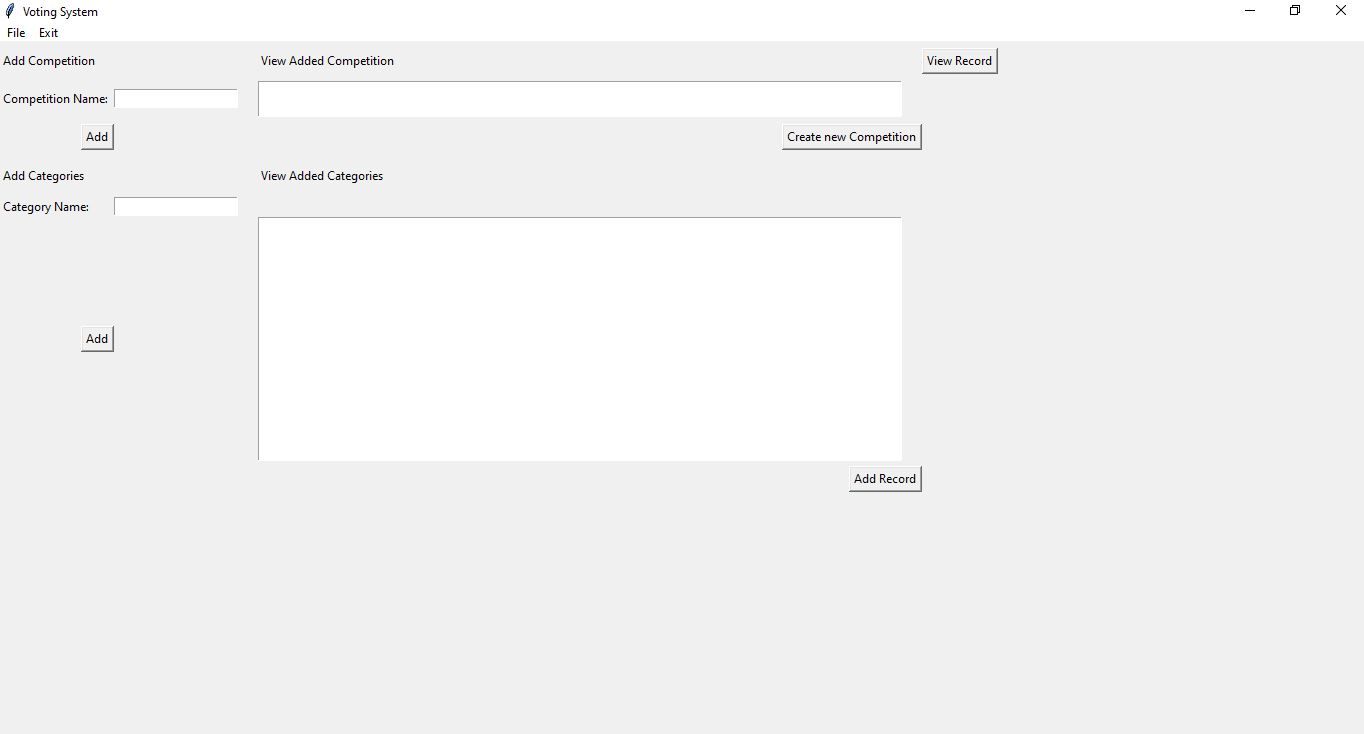
Create a addCompetition.py file in the overviewSystem folder. Then copy the code below into the file.
import os
from tkinter import *  # To Create An Actual Windows Application
from tkinter import messagebox
import sqlite3
from sqlite3 import Error
from datetime import datetime

competition = []
category = []

main = Tk()  # Initializing the GUI (Graphical User Interface)
main.geometry("1366x768")  # Size of the App
main.title("Voting System")
# main.resizable(0, 0)

name = StringVar()
student_class = StringVar()
student_regno = StringVar()

# add menu bar
menubar = Menu(main)
main.config(menu=menubar)

# create a menu
file_menu = Menu(menubar, tearoff=False)
exit_menu = Menu(menubar, tearoff=False)


# Exit The Application Function


def Exit():
    sure = messagebox.askyesno(
        "Exit", "Are you sure you want to leave?", parent=main)
    if sure == True:
        main.destroy()


def create_category(entry, category):
    entry.append(category)
    return


def add_competition():
    entry = e1.get()
    if (len(competition) == 0):
        competition.append(entry)
        print(competition)
        for item in competition:
            d1.insert(END, item + "\n")


def new_competition():
    if (len(competition) == 1):
        competition.clear()
        category.clear()
        d1.delete("1.0", "end")
        e1.delete(0, END)
        d2.delete("1.0", "end")
        e2.delete(0, END)


def add_categories():
    entry = e2.get()
    if (len(competition) == 1):
        category.append(entry)
        print(category)
        d2.delete("1.0", "end")
        for item in category:
            d2.insert(END, item + "\n")
            e2.delete(0, END)


def add_to_database():
    sure = messagebox.askyesno(
        "Add to database", "Are you sure you want to add the records?", parent=main)
    if sure == True:
        for item in category:
            conn = sqlite3.connect(
                r"C:\Users\SHOPINVERSE\Desktop\tic atelier\Voting System\public\db\voting.db")
            cur = conn.cursor()
            cur.execute("INSERT INTO competition(category, competition, begin_date) values(?,?,?)",
                        (item, competition[0], datetime.now()))
            conn.commit()
            conn.close()
        competition.clear()
        category.clear()
        d1.delete("1.0", "end")
        e1.delete(0, END)
        d2.delete("1.0", "end")
        e2.delete(0, END)
        messagebox.showinfo(
            "Success", "Competition Records Added Successfully")


def top():
    main.withdraw()
    os.system("python public/overviewSystem/viewRecords.py")
    main.destroy()


main.protocol("WM_DELETE_WINDOW", Exit)

# add a menu item to the menu
exit_menu.add_command(
    label='Exit',
    command=Exit
)

# add the File menu to the menubar
menubar.add_cascade(
    label="File",
    menu=file_menu
)

menubar.add_cascade(
    label="Exit",
    menu=exit_menu
)


# Create Add Competition Grid
h1 = Label(main, text="Add Competition")
l1 = Label(main, text="Competition Name: ")
e1 = Entry(main)
b1 = Button(main, text="Add", command=add_competition)

# grid method to arrange labels in respective
# rows and columns as specified
h1.grid(row=0, column=0, sticky=W, pady=5)
l1.grid(row=1, column=0, sticky=W, pady=2)
e1.grid(row=1, column=1, pady=2)
b1.grid(row=2, column=0, sticky=E, pady=5)

# View Added Competition
h2 = Label(main, text="View Added Competition")
d1 = Text(main, height=2)
b2 = Button(main, text="Create new Competition", command=new_competition)

# grid method to arrange labels in respective
# rows and columns as specified
h2.grid(row=0, column=3, sticky=W, pady=5, padx=20)
d1.grid(row=1, column=3, sticky=W, pady=2, padx=20)
b2.grid(row=2, column=3, sticky=E, pady=5)


# Create Add Categories Grid
h3 = Label(main, text="Add Categories")
l2 = Label(main, text="Category Name: ")
e2 = Entry(main)
b3 = Button(main, text="Add", command=add_categories)

# grid method to arrange labels in respective
# rows and columns as specified
h3.grid(row=4, column=0, sticky=W, pady=10)
l2.grid(row=5, column=0, sticky=W, pady=0)
e2.grid(row=5, column=1, pady=0)
b3.grid(row=6, column=0, sticky=E, pady=5)

# View Added Categories
h4 = Label(main, text="View Added Categories")
d2 = Text(main, height=15)
b4 = Button(main, text="Add Record", command=add_to_database)

# grid method to arrange labels in respective
# rows and columns as specified
h4.grid(row=4, column=3, sticky=W, pady=10, padx=20)
d2.grid(row=6, column=3, sticky=W, pady=0, padx=20)
b4.grid(row=7, column=3, sticky=E, pady=5)

# View Records In Competition
b5 = Button(main, text="View Record", command=top)
b5.grid(row=0, column=5, sticky=W, pady=5)

main.mainloop()
Output: